
After-call webhooks
Send a JSON event to your own system every time a call finishes. The full reference — when it fires, the exact payload, the headers, and how to verify the signature.
After-call webhooks let your agent notify your own systems the moment a call
finishes. Zavo sends a single JSON POST to a URL you control — with the call's
details and the AI's insights — so you can sync it to your CRM, kick off a
follow-up, update a spreadsheet, or anything else.
This page is the technical reference for the webhook: when it fires, the exact payload shape, the headers we send, and how to verify the request really came from Zavo.
Who this is for
Setting up a webhook means pointing Zavo at an HTTPS endpoint you've built. If you just want your team to be emailed or texted after a call, use Send email and text alerts instead — no code required.
When a webhook fires
A webhook is sent once a call reaches a final state — one of:
completed— the call ran its course and hung upfailed— the call couldn't be placed or dropped with an errorno_answer— nobody picked upvoicemail— the call went to voicemail
There's exactly one webhook per call, per endpoint. We never send the
call.finished event twice for the same call to the same webhook (though a
single event may be retried if your endpoint doesn't accept it — see
Retries and delivery).
If your agent has call insights enabled (the AI summary, sentiment, and
outcome), Zavo waits for those to be ready — up to 15 minutes — before
sending, so the payload arrives complete. If insights aren't enabled (for
example on a zero-data-retention agent), the webhook fires right away and the
insights fields come back null.
Add a webhook
Webhooks are configured per agent, in the agent builder. Open your agent, then in the setup checklist expand Technical settings (optional) at the bottom of the sidebar and choose Send webhooks — webhooks live here, tucked away from the everyday setup steps. Then fill in the webhook:
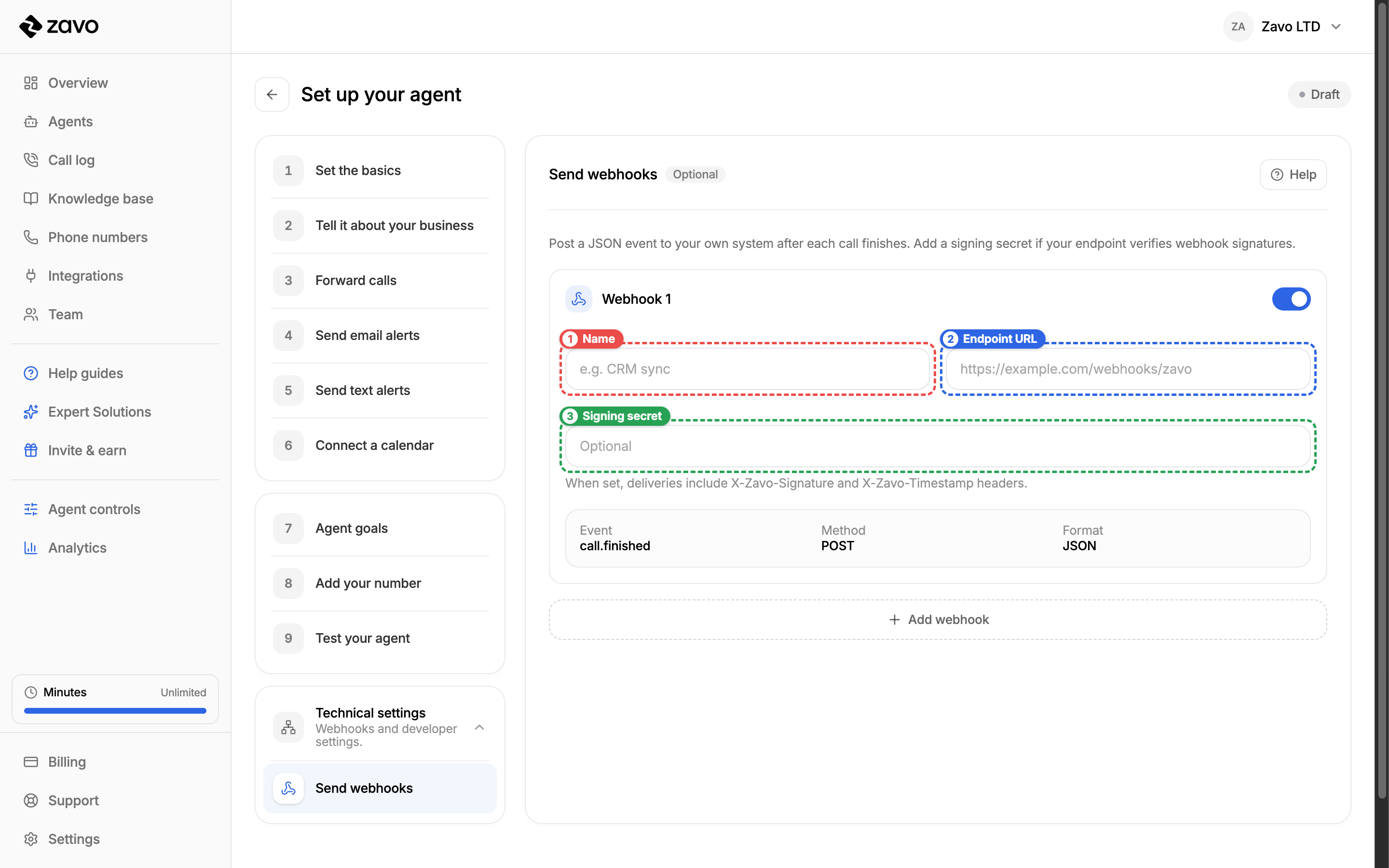
- Name (1) — a label for you, so you can tell your webhooks apart (e.g. "CRM sync"). It's never sent to your endpoint.
- Endpoint URL (2) — the public HTTPS URL Zavo will
POSTto, e.g.https://example.com/webhooks/zavo. - Signing secret (3) (optional) — set this if your endpoint verifies that
requests genuinely came from Zavo. When set, every delivery includes the
X-Zavo-SignatureandX-Zavo-Timestampheaders. See Verify the signature.
Use the toggle to enable or disable a webhook without deleting it, and Add webhook to send to more than one endpoint.
You can add up to 10 webhooks per agent. Each one receives its own copy of every event.
Endpoint requirements
Your URL must be a public HTTPS address. Zavo rejects http://,
localhost, private/internal IP ranges, and URLs that embed credentials
(https://user:pass@…). This protects against a webhook being pointed at
internal infrastructure.
The request
Each delivery is an HTTP POST with a JSON body.
| Header | Example | Description |
|---|---|---|
Content-Type | application/json | The body is always JSON. |
User-Agent | Zavo-Webhooks/1.0 | Identifies the sender. |
X-Zavo-Event | call.finished | The event type. |
X-Zavo-Webhook-Id | crm-sync | The id of the webhook in your config. |
X-Zavo-Delivery | f47ac10b-58cc-4372-a567-0e02b2c3d479 | A unique ID for this delivery (one per call + webhook). Stable across retries, so it also works as an idempotency key. |
X-Zavo-Timestamp | 1717926204 | Unix time (seconds) when the request was signed. Part of the signature. |
X-Zavo-Signature | v1=… | HMAC-SHA256 signature. Only present when a signing secret is set. |
The payload
The body is a single JSON object. Here's a complete example for an inbound call that was answered:
{
  "id": "call.finished:call_1:crm-sync",
  "type": "call.finished",
  "apiVersion": "2026-06-08",
  "createdAt": "2026-06-08T10:03:24.000Z",
  "data": {
    "organizationId": "org_1",
    "agent": {
      "id": "agent_1",
      "name": "Sophie"
    },
    "call": {
      "id": "call_1",
      "direction": "inbound",
      "state": "completed",
      "outcome": "completed",
      "fromNumber": "+447700900123",
      "toNumber": "+442079460000",
      "startedAt": "2026-06-08T10:00:00.000Z",
      "endedAt": "2026-06-08T10:03:24.000Z",
      "durationSec": 204
    },
    "insights": {
      "summary": "Caller asked about pricing.",
      "callerName": "Alex",
      "sentiment": "happy",
      "businessOutcome": "answered"
    }
  }
}
Top-level fields
| Field | Type | Description |
|---|---|---|
id | string | A stable ID for this event, the same across every retry. Use it as your idempotency key. Format: call.finished:<callId>:<webhookId>. |
type | string | The event type. Always call.finished today. |
apiVersion | string | The payload schema version. Currently 2026-06-08. We bump this if the shape changes. |
createdAt | string | ISO 8601 timestamp for the event — the call's end time. |
data | object | The event body — see below. |
data
| Field | Type | Description |
|---|---|---|
data.organizationId | string | Your Zavo organization ID. |
data.agent | object | The agent that handled the call. |
data.call | object | The call's metadata. |
data.insights | object | AI-extracted insights about the call. |
data.agent
| Field | Type | Description |
|---|---|---|
id | string | null | The agent's ID. |
name | string | null | The agent's display name. |
data.call
| Field | Type | Description |
|---|---|---|
id | string | The Zavo call ID. |
direction | enum | inbound or outbound. |
state | enum | The call's final state: completed, failed, no_answer, or voicemail. |
outcome | enum | null | What happened on the call: completed, transferred, voicemail, no_answer, failed, or abandoned. |
fromNumber | string | null | The caller's number in E.164 (e.g. +447700900123). |
toNumber | string | null | The number that was dialled, in E.164. |
startedAt | string | null | ISO 8601 timestamp for when the call connected. |
endedAt | string | null | ISO 8601 timestamp for when the call ended. |
durationSec | integer | null | Call length in whole seconds. |
data.insights
| Field | Type | Description |
|---|---|---|
summary | string | null | A short AI recap of the call. |
callerName | string | null | The caller's name, if they gave it. |
sentiment | enum | null | The caller's overall mood: happy, neutral, confused, frustrated, or angry. |
businessOutcome | enum | null | What the call achieved: booked, qualified, answered, follow_up, spam, or other. |
Insights can be null
Every field under data.insights is null when insights aren't available —
for instance on a zero-data-retention agent, or if the AI couldn't determine a
value. Always handle null for these fields.
Verify the signature
If you set a signing secret on the webhook, Zavo signs every request so you can confirm it's genuine and untampered. Verification is strongly recommended for any endpoint that acts on the data.
The signature is an HMAC-SHA256 of the timestamp and the raw request body, joined with a dot:
signed_message = X-Zavo-Timestamp + "." + raw_request_bodyThe X-Zavo-Signature header carries the result as v1=<hex digest>.
To verify:
- Read the raw request body exactly as received — verify before parsing the JSON, since re-serializing can change the bytes.
- Recompute
HMAC-SHA256(secret, "<X-Zavo-Timestamp>.<raw body>")and hex-encode it. - Compare your
v1=<digest>against theX-Zavo-Signatureheader using a constant-time comparison. - (Optional but recommended) reject the request if
X-Zavo-Timestampis more than a few minutes old, to limit replay attacks.
import { createHmac, timingSafeEqual } from "node:crypto";

// `rawBody` must be the exact bytes/string of the request body,
// captured before any JSON parsing.
function verifyZavoSignature({ rawBody, headers, secret }) {
  const signature = headers["x-zavo-signature"]; // "v1=<hex>"
  const timestamp = headers["x-zavo-timestamp"]; // unix seconds
  if (!signature || !timestamp) return false;

  const expected =
    "v1=" +
    createHmac("sha256", secret)
      .update(`${timestamp}.${rawBody}`)
      .digest("hex");

  const a = Buffer.from(signature);
  const b = Buffer.from(expected);
  return a.length === b.length && timingSafeEqual(a, b);
}import hmac
import hashlib
def verify_zavo_signature(raw_body: bytes, headers, secret: str) -> bool:
signature = headers.get("X-Zavo-Signature", "")
timestamp = headers.get("X-Zavo-Timestamp", "")
if not signature or not timestamp:
return False
message = f"{timestamp}.".encode() + raw_body
expected = "v1=" + hmac.new(
secret.encode(), message, hashlib.sha256
).hexdigest()
return hmac.compare_digest(signature, expected)Retries and delivery
A delivery is successful when your endpoint responds with a 2xx status
within 10 seconds. Anything else — a non-2xx status, a timeout, or a
connection error — counts as a failure and is retried.
- Retries run with backoff for up to 24 hours (up to 10 attempts total). After that the delivery is marked failed and not retried.
- At-least-once delivery. Because of retries, your endpoint may occasionally
receive the same event more than once. Deduplicate on the payload's
idfield — it's identical across every retry. TheX-Zavo-Deliveryheader is also stable per delivery and works just as well as a dedup key. - No ordering guarantees. Don't assume events arrive in the order calls finished.
Respond fast, work async
Return 2xx as soon as you've safely received the event, then do any slow
processing in the background. If you do heavy work before responding and blow
the 10-second budget, Zavo treats it as a failure and retries — which can
cause duplicate processing on your side.
Build a reliable endpoint
A quick checklist for a production webhook receiver:
- Serve public HTTPS. Required —
http://, localhost, and private IPs are rejected at save time. - Capture the raw body before parsing, so you can verify the signature.
- Verify
X-Zavo-Signaturewith a constant-time compare when you've set a secret. - Deduplicate on
idso retries don't double-process a call. - Tolerate
nullin everyinsightsfield, and in the nullablecallfields. - Respond
2xxquickly, and move heavy work off the request path. - Ignore unknown fields — new fields may be added under a future
apiVersionwithout breaking the current shape.